
For all Joomla 3+ templates built using the Zen Grid Framework v4 (any theme after October 2014) please refer to the Zen Grid Framework v4 documentation.
The hidden panel is a core feature of Zen Grid compatible templates and is a great way to display important but non-essential information on the page via a sliding panel that is toggled on and off via a trigger at the top of the page. The panel is automatically published if you publish any module to the panel1, panel2, panel3 and panel4 module positions.
Please view the descriptions below for more insight into how the hiddden panel works.
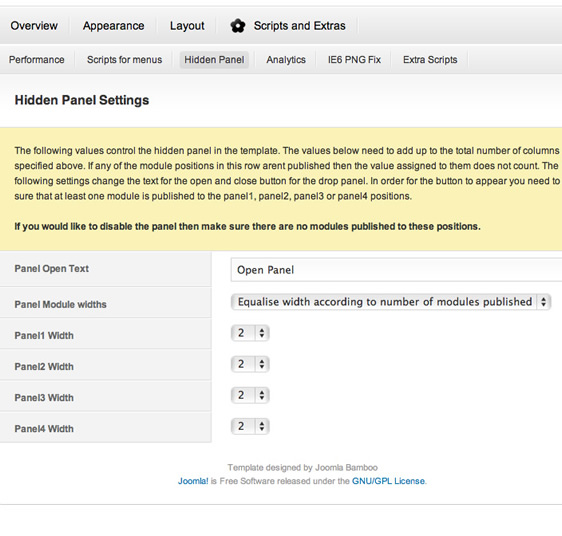
Open Panel Text
Determines the text used when the hidden panel is closed.
Close Panel Text
Determines the text used when the hidden panel is open
Panel Module Widths
This setting determines whether the module widths will be equalised based on the number of modules published to the panel positions or whether the settings for the individual module widths in the last four options apply.
Panel1 Width to Panel4 Width
If the setting above is set to use individual module widths then the last four settings control the widths assigned to the four modules published to the panel1 to panel4 positions.
Depending on the template you are using there may well be addiitonal parameters to control the appearance and behaviour of the panel.
Developers note
On occasion the layout for the panel is overridden in a layout file, or removed from the panel layout and implemented in a different layout file. The javascript used to create the panel is also often modified and tailored to suit the functionality within a specific template.
All modifications to the javascript can be found in the templates/your template/js/template.js file.
v1.1+ templates have two javascript for controlling the way that the hidden panel behaves and we have made these two options available via hooks that can be utilised in the templates/yourtemplate/includes/templateVariables.php file.
Popup.js
The popup.js type of hidden panel as seen in the Avanti Template demo when implemented triggers the loading of the templates/zengridframework/js/popup.js file. This popup can be implemented via using the following syntax in the templateVariables.php file:
{codecitation}
// Variable for disabling the core panel popup javascript. Need to set this to 0 if the template.js file contains js. This is more or less a hidden variable to control which script we use.
$zgfPanelJS = $this->params->get("zgfPanelJS","1");
{/codecitation}
The markup required for the popup.js file can be viewed in the template/zengridframework/index.php file starting from this block of code:
{codecitation}
<?php/* * If panel.php was found in the style folder, include it */
if ($panel > "0") {
if ($panelFile) : require("$panelFile");
else :
?>
{/codecitation}
The css that relates to the elements generated by the popup.js method is:
{codecitation}
/* Hidden Panel Styling */
a#open {}
#paneltab a {}
.overlay div.close{}
#panelInner {}
#panelInner h3 {}
{/codecitation}
HiddenPanel.js
A more flexible option for implementing the hidden panel is by using the hiddenpanel.js.
{codecitation}
// Hidden Variable - Prevents the core hidden panel js from loading
$hiddenpanelLoad ="1";
{/codecitation}
This syntax used in the templateVariables file will trigger the loading of the hiddenpanel.js file.
The markup required for this technique looks like this:
{codecitation}
<!-- Hidden Panel -->
<div id="overlay"></div>
<!-- Trigger for hidden panel -->
<div id="paneltabWrap">
<div id="paneltab" class="tab">
<a id="openPanel" rel="#panelInner" href="#">
<img src="/templates//images/icons/" title="open panel" alt=""/></a>
</div>
</div>
<!--Trigger for hidden panel -->
<div id="hiddenPanel" style="width:px" class="overlay">
<a id="closePanel" rel="#panelInner" href="#">
<img src="/templates//images/panel/panelClose.png" class="closePanelImg" alt="Close Panel" />
</a>
<div id="hiddenPanelInner" style="width:px">
<?php if($this->countModules('panel1')) : ?>
<div id="panel1" style="width:px">
<jdoc:include type="modules" name="panel1"style="jbChrome"/>
</div>
<div id="panel2" style="width:px">
<jdoc:include type="modules" name="panel2"style="jbChrome"/>
</div>
<div id="panel3" style="width:px">
<jdoc:include type="modules" name="panel3"style="jbChrome"/>
</div>
<div id="panel4" style="width:px">
<jdoc:include type="modules" name="panel4"style="jbChrome"/>
</div>
<?php endif; ?>
</div>
</div>
<!-- Hidden Panel -->
<?php endif; ?>
{/codecitation}
Here is an example of the css classes available for this method:
{codecitation}
/* Hidden Panel
---------------------------------------------------*/
#paneltabWrap {}
#paneltab{}
a#closePanel {}
.overlay div.close{}
#paneltab a{}
#paneltab a:hover { }
/* Hidden Panel Container
---------------------------------------------------*/
#hiddenPanel h3 {}
#hiddenPanel {}
#hiddenPanelInner {}
/* Overlay Styles
---------------------------------------------------*/
#overlay {}
{/codecitation}